Why your best AI use cases feel oddly specific
You’ve probably noticed the wins don’t come from “use AI everywhere.” They come from narrow moments: turning rough notes into a clean email, reshaping a deck for a different audience, or pulling themes from a long thread. That specificity isn’t a limitation of your imagination; it’s a clue about the work. Tasks with clear inputs, flexible wording, and low downside for small mistakes tend to benefit fast. Tasks that depend on hidden context, precise facts, or decisions you’ll be accountable for often feel slower, because you spend the saved time checking and correcting.
The mismatch is easiest to see in the same job, on the same day. Drafting three alternative customer responses can be a net win, while asking for the “right” policy interpretation can create risk. The tool can produce fluent text in both cases, but the second one demands correctness and situational nuance that you still have to supply and verify. When your best uses feel oddly specific, it’s usually because you’ve found the boundary where speed stops being the main goal and accuracy becomes the cost.
Start with the task, not the tool

Picture the moment you reach for AI: a blank page, a messy set of notes, an inbox full of variants. The mistake is to start by asking, “What can this model do?” instead of, “What am I trying to get done, and what counts as done?” A task is a bundle of requirements—accuracy, tone, completeness, confidentiality, and who owns the final call. Once those are explicit, the fit becomes easier to judge.
Advertisement
Try framing the work as an input-output pipeline. What are the inputs you can safely provide (a spec, a transcript, a list of constraints)? What output is acceptable (options, a first draft, a summary), and what is not (a definitive answer you’ll forward unreviewed)? This also forces the practical question: how will you verify it? If verification requires opening five systems or checking numbers line by line, the “time saved” can evaporate, and the risk shifts onto you anyway.
Where generative AI shines: drafting, remixing, summarizing
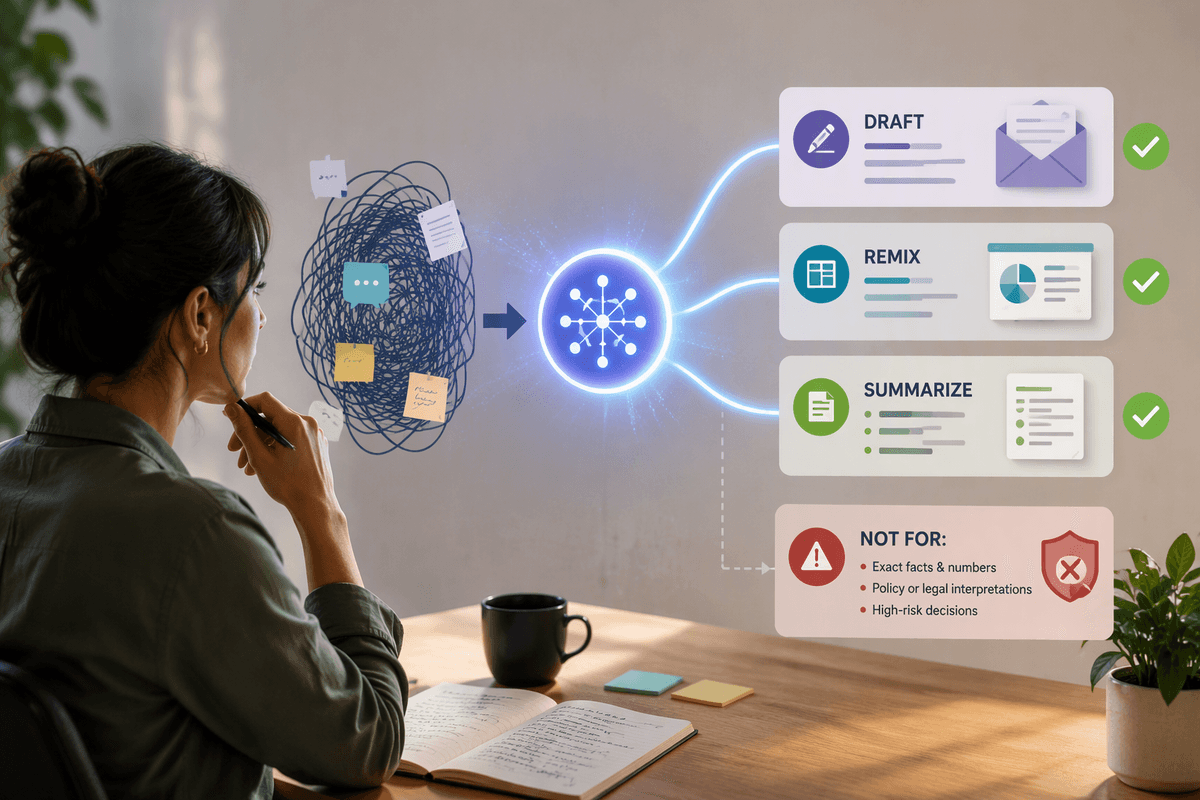
You feel the best lift when the job is mostly language and structure, not ground truth. Give a model raw material—bullets from a meeting, a rough PRD, a customer complaint thread—and it can turn that into a usable first pass: three email drafts with different tones, a tighter narrative for a deck, or a set of headings that makes a doc easier to scan. The point isn’t that it “knows” your business; it’s that it’s fast at producing coherent variations you can choose from.
Remixing is similar. It can rewrite the same content for executives versus implementers, convert FAQs into a help-center article, or compress a long update into a status note. Summarizing works best when you can tolerate imperfect recall: pulling themes, open questions, and action items from long notes. You still need to spot-check details and add the context the input didn’t include.
Advertisement
Reality check: accuracy, context, and the cost of errors
The rough edge shows up when the output has to be correct, not just well-written. Models can state plausible-but-wrong facts, mix up dates, misread a table, or confidently fill gaps you didn’t know were gaps. They also don’t reliably know what matters in your specific environment—your pricing exceptions, the “we promised this customer” nuance, the private roadmap constraint—unless you supply it. If you can’t include that context (because it’s sensitive, scattered across systems, or too time-consuming to gather), the answer may sound complete while quietly missing the one detail that changes the decision.
That’s where the real cost sits: verification and accountability. If an AI-generated summary drops a key caveat, the downstream damage might be an awkward meeting. If it misstates numbers in a forecast, misquotes a contract term, or invents a compliance requirement, you can burn days unwinding it—and your name is still on the work. Where will you validate facts, figures, and citations, and how long does that take? If you can’t verify quickly from a trusted source, treat the output as a draft of wording, not a draft of truth.
When AI helps less: deep judgment and novel problem solving
Advertisement
You notice the drop-off when the job isn’t “write it” but “decide it.” Picking a launch trade-off, diagnosing why a metric moved, or choosing the right response to an angry enterprise customer often hinges on tacit context: what’s politically feasible, what the team can realistically ship, which promises were made in side conversations, and what failure looks like in your org. A model can suggest reasonable options, but it can’t feel the constraints that live in calendars, relationships, and history unless you spell them out—and even then, it won’t own the call.
Novel problem solving is similar. When you’re exploring an unfamiliar bug pattern, designing an experiment, or untangling a messy operational incident, the hard part is building the right mental model and updating it as new evidence arrives. AI can help generate hypotheses or checklists, but it tends to smooth over uncertainty. You can lose an hour chasing a confident-but-generic path when you needed slow, local reasoning and a tight feedback loop with real data.
A quick fit test you can run in five minutes

You’re staring at a task and wondering if AI will help or just add cleanup. Run a quick fit test: write down (1) the input you can provide in one paste, (2) what a “good enough” output looks like, and (3) how you’ll verify it. If the input is mostly text you already have (notes, a spec, a thread) and “good enough” means a usable draft or a set of options, it’s usually high value. If “good enough” requires exact numbers, correct citations, or a policy-perfect answer, treat AI as limited value unless you have a fast, trusted way to check.
Then do a 60-second risk scan: what happens if it’s subtly wrong? If the downside is a slightly clunky email you’ll edit, proceed. If the downside is a customer commitment, a compliance issue, or a decision you can’t easily reverse, don’t outsource the thinking. The hidden cost is context-gathering; if you have to assemble five screenshots just to prompt it, you already have your answer.
Build a portfolio of uses, not a blanket policy
In practice, teams do better with a short “portfolio” of approved patterns than a single rule like “use AI” or “don’t use AI.” Keep a few high-value defaults (drafting customer replies, rewriting for tone, summarizing long notes), a few limited-use cases (idea generation, checklists, alternative angles), and a clear “not worth it” list (final numbers, contractual terms, compliance interpretations). Then attach lightweight guardrails: what inputs are allowed, what must be verified, and what requires a human sign-off. Someone has to maintain these norms as workflows, tools, and risk tolerance change.