Why vulnerability hunting feels different this year
Vulnerability hunting feels different this year because “finding issues” is no longer the hard part—deciding what’s real, reachable, and worth fixing first is. Most teams already run enough scanners to generate thousands of alerts, yet still miss the handful of exploitable paths created by new code, new dependencies, and fast-moving cloud changes. Defensive AI is entering that gap: it can correlate weak signals across repos, tickets, configs, and runtime logs, and it can explain likely exploit chains in plain language.
The shift is practical, not magical. When AI works, it reduces triage time and pushes engineers toward higher-confidence work faster. When it doesn’t, it can add a new layer of plausible-sounding false positives, or quietly miss environment-specific conditions that a human would catch. The teams want speed and coverage, but they need proof—repro steps, asset context, and clear ownership—before changing a backlog or opening an incident.
From noisy scanners to AI-augmented investigation
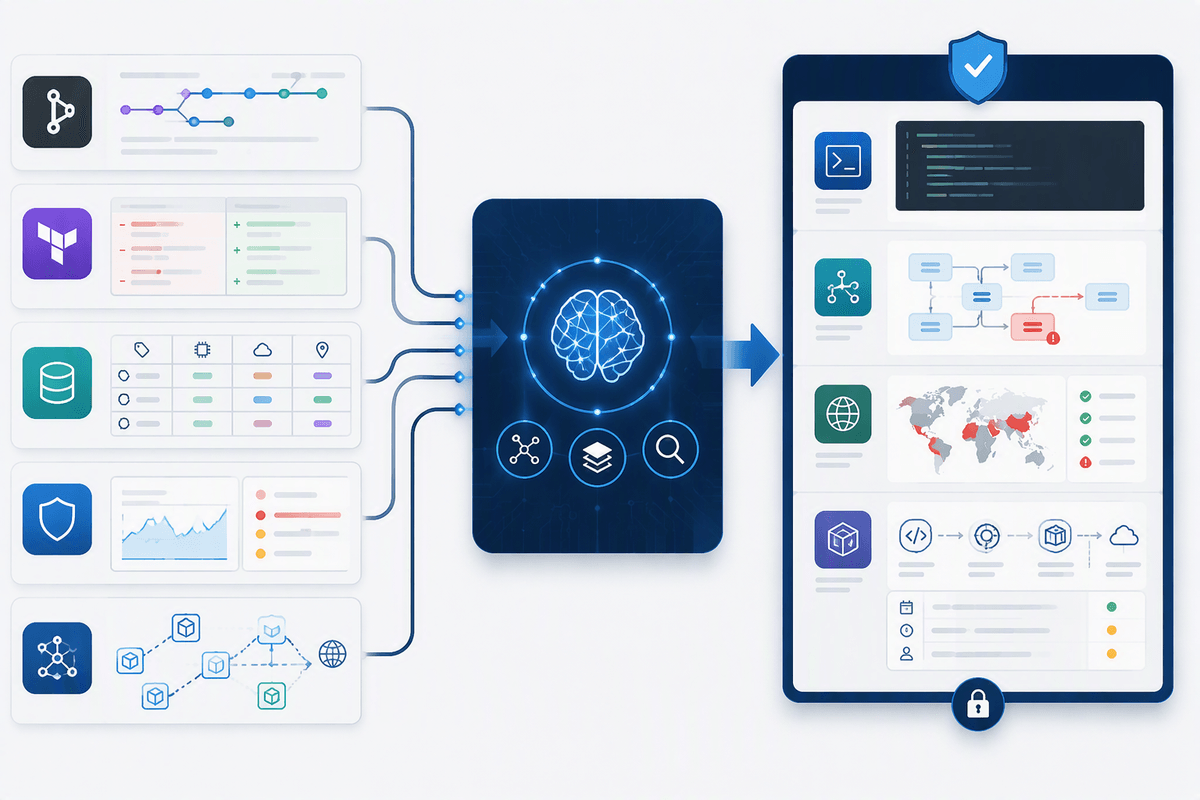
A familiar pattern plays out after every scan: the same “high” findings resurface across environments, owners argue about whether the asset is even internet-facing, and someone spends an hour proving a library is unused or a port is blocked by a security group. AI-augmented investigation aims to compress that proof-gathering loop. Instead of treating each alert as a standalone item, it can pull in repo history, IaC diffs, CMDB tags, WAF or EDR telemetry, and service maps to answer basic questions quickly: is the vulnerable component present in the running build, is there a reachable route to it, and who can actually fix it.
The best tools behave less like “smarter scanners” and more like assistants that assemble an evidence packet: affected call paths, exposure checks, and links to the exact deployment. The practical constraint is data access—without clean identities, accurate inventory, and permission to read logs and code, AI will guess, and those confident guesses can create more noise than the scanner you started with.
Where defensive AI actually helps find real bugs
Advertisement
Picture the difference between an alert that says “possible SQL injection” and an alert that shows the parameter, the code path that builds the query, the controller route that receives it, and the exact ingress that can reach it in production. Defensive AI helps most when it turns vague categories into testable hypotheses. It can trace data flow across files, summarize the “how would this be exploited” story, and propose a minimal proof-of-concept request that an engineer or tester can validate quickly. That kind of narrowing is where real bugs get found, because it replaces days of back-and-forth with a focused verification sprint.
It also helps by de-duplicating and prioritizing across systems: grouping the same root cause across services, spotting the one internet-exposed instance among many, and flagging regressions introduced by a recent merge or IaC change. These wins depend on reliable context. If the model can’t see the deployed build, runtime routes, or auth boundaries, it may “complete the story” incorrectly—so teams should treat AI output as a lead generator until a human reproduces impact in the target environment.
AI in code review, SAST, and dependency risk
In day-to-day code review, the biggest win from AI is catching “near misses” that humans skim past: a helper that disables TLS verification for a quick test, a new endpoint added without auth checks, or input validation that looks consistent but breaks on one path. AI-augmented SAST is most useful when it can point to the exact sink and the specific data flow that reaches it, then generate a concrete test case or a small patch suggestion. It is less useful when it produces generic guidance, because reviewers still have to do the same work to prove reachability and impact.
Dependency risk is where many teams see fast, measurable impact—if the tool can answer whether a vulnerable package is actually in the shipped artifact, loaded at runtime, and reachable from an exposed route. That requires SBOM accuracy, build-system integration, and sometimes container image scanning, which adds cost and pipeline time. AI can help prioritize, but it can’t replace the hard constraint: you still need a reproducible link from CVE to running code before you disrupt teams with “urgent” upgrades.
Attack surface discovery and runtime signals get smarter
Advertisement
A common failure mode in attack surface management is arguing about “what we have” while the environment changes underneath you: a new subdomain from a marketing tool, a temporary dev endpoint left exposed, or a cloud load balancer created by an IaC module no one remembers owning. AI-assisted discovery helps by reconciling multiple partial truths—DNS and certificate data, cloud accounts, ingress controllers, API gateways, and service maps—into a more stable picture of what is actually reachable. The useful output isn’t a bigger asset list; it’s a smaller set of externally exposed entry points with clear owners and change history.
Runtime signals get smarter in a similar way. Instead of treating WAF hits, auth failures, and error logs as separate dashboards, AI can cluster them into “this looks like active probing of this route on this deployment,” and tie that to a specific version and dependency set. The constraint is telemetry quality and retention: gaps in logging, inconsistent service naming, and short log windows can make reachability and exploitability look cleaner than reality.
Choosing tools: data access, privacy, and evaluation tests

Tool selection usually starts with a simple question: “Can it see what our analysts see?” If the product can’t read the deployed artifact, the IaC that exposes it, and the logs that show whether it’s being hit, its AI layer will rely on weak proxies and confident guesswork. Plan for the integration work up front—SSO, repo and CI access, cloud permissions, and naming consistency across CMDB and telemetry—because that effort often costs more time than the license. Favor tools that let you control exactly which data sources are used for each workflow, and that preserve traceable links back to raw evidence.
Privacy and governance are not checkboxes; they change what “helpful” looks like. Decide whether code, secrets, and customer data can leave your environment, whether prompts and outputs are retained, and who can retrieve them later for audits. Require clear options for tenant isolation, encryption, and data retention controls, plus a documented stance on training data usage.
Advertisement
Run an evaluation like you would a detection pilot: a fixed test set of past findings and known-good non-issues, scored for false positives, false negatives, and time-to-triage. Include at least a few environment-specific cases—auth boundaries, internal-only routes, feature flags—because generic benchmarks won’t reveal where the tool will mislead you.
New workflows: humans validate, AI accelerates, metrics change
On a typical Tuesday, the bottleneck isn’t running another scan; it’s turning a pile of “high” findings into a short list an engineer will trust. The workflow that tends to hold up is simple: let AI draft the ticket, but require it to attach evidence—exact asset, deployed version, suspected call path, exposure proof, and a suggested validation step—before it can enter the team’s real queue. Analysts then spend their time validating impact and reachability, not rewriting descriptions or chasing ownership. This also makes it easier to set rules: auto-close duplicates, auto-route by repo/service tags, and auto-escalate only when runtime signals or exposure checks support it.
Metrics have to move with the workflow. Counting “findings created” rewards noise, especially if AI can generate plausible-but-wrong narratives. More useful measures are time-to-triage, percent of findings with reproducible steps, reopen rate after closure, and how often a “critical” label survives human validation. Expect a real cost: building the integrations, maintaining access controls, and curating the test set becomes ongoing work, not a one-time rollout.
What to do next: start small and harden trust
The safest way to adopt defensive AI is to pick one narrow, high-friction step and make it measurably better: for example, auto-generating evidence packets for dependency alerts or routing internet-exposed assets to the right owner. Set a rule that AI output cannot create a “real” ticket without links to raw proof (build artifact, config, logs) and a human validation step, then track whether time-to-triage actually drops and whether reopen rates stay flat.
Harden trust like any detection system: maintain a fixed evaluation set, rerun it after model or integration changes, and publish precision/recall numbers your stakeholders can understand. Budget for the ongoing costs—permissions reviews, data retention controls, prompt/output auditing, and integration drift—because reliability usually fails at the seams, not in the demo.