Why your “upright” image may not be upright
You open a JPEG from a phone, it looks upright in Preview, Photos, or your browser, so you assume the pixels are stored upright. Often they aren’t. Many cameras save the sensor output “as-shot” and add an EXIF Orientation tag that says how to rotate or flip the image for display. Some tools apply that tag automatically when decoding, others ignore it, and a few will apply it and still keep the tag around. The result is a file that appears consistent to humans but is ambiguous to code, and that ambiguity shows up as rotated inputs and drifting labels.
EXIF Orientation in practice: what it changes and what it doesn’t
In practice, EXIF Orientation is not a pixel transform until something chooses to apply it. The JPEG bitstream can stay exactly the same while the tag changes from “normal” to “rotate 90°,” and many viewers will immediately show a different visual result even though the underlying width/height and pixel order in the file are unchanged. That’s why the same file can look correct in a gallery app yet come into your pipeline “sideways” if your decoder ignores the tag.
What the tag does change, when honored, is the displayed coordinate system: top-left origin, x/y axes, and whether the image is mirrored. What it does not automatically change are your annotations and derived data—boxes, masks, keypoints, camera intrinsics, or any cached resize/crop parameters. If you rotate pixels but don’t rotate labels (or rotate labels twice), alignment breaks silently. Normalizing costs a full decode and re-encode if you persist the result, and it can strip other metadata you may still want.
The symptoms: wrong boxes, rotated masks, inconsistent keypoints
Advertisement
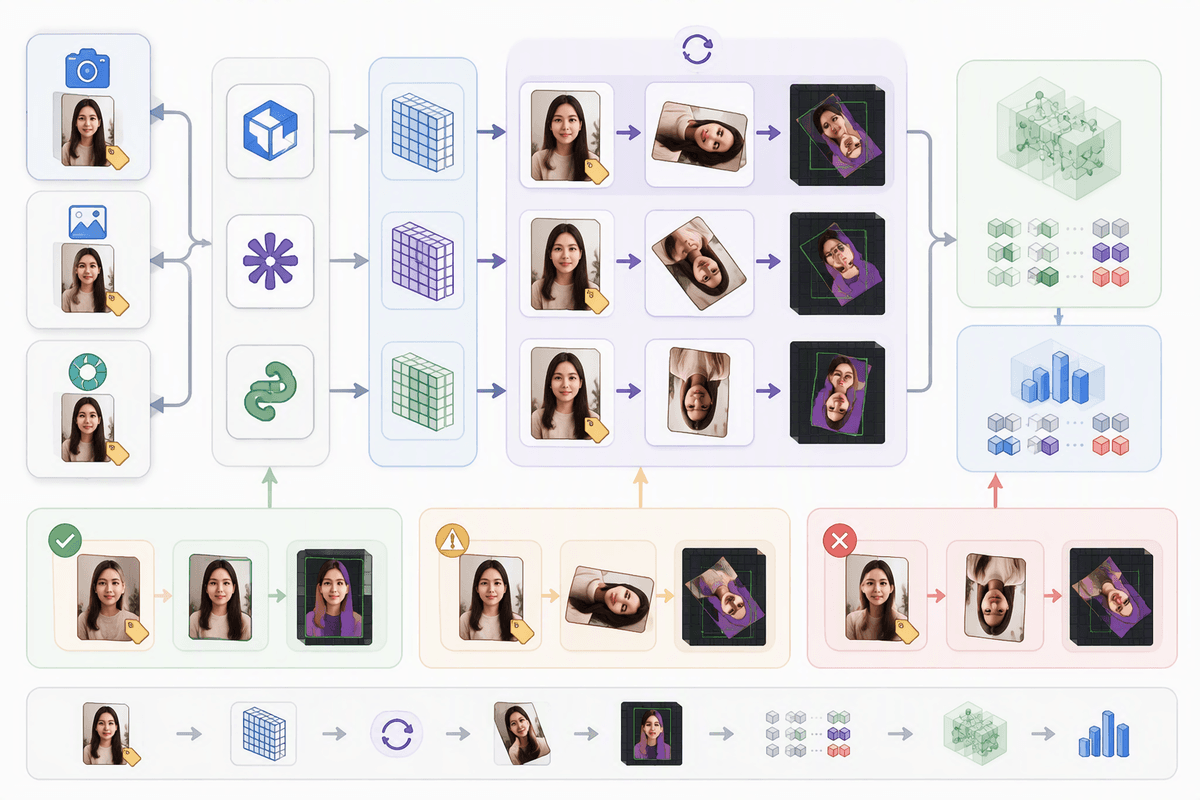
You usually notice this only after you’ve built enough pipeline to trust it. A training image looks fine in your labeling UI, but the same sample renders sideways in a debug notebook. Boxes that were tight in the tool are shifted or swapped (x and y feel “transposed”), and your evaluator reports sudden drops that cluster around phone photos. A common clue is that failures correlate with portrait images: width/height seem “right” in one stage and inverted in another, so a model trained on one coordinate system is scored on another.
Masks make it more obvious. A rotated decode turns a clean polygon into a diagonal smear, or a crisp binary mask no longer overlaps the object at all. Keypoints fail in a distinctive way: they’re roughly the right shape, but the skeleton is rotated 90° or mirrored, so left/right landmarks flip. Some batches are perfect—because the behavior depends on which library loaded the image, whether a conversion step dropped EXIF, and whether any stage applied orientation while leaving the tag behind.
Where orientation sneaks in: libraries, loaders, and file conversions
Advertisement
A familiar failure mode is that “the same image” looks upright in one place and sideways in another because different decoders make different choices. One loader applies EXIF Orientation during decode (so pixels are rotated), another returns raw pixels and leaves orientation in metadata, and a third applies the rotation but also preserves the original tag—setting you up for a later double-rotation. This shows up when you mix ecosystems: a labeling tool’s preview, a Python data loader, a mobile capture SDK, and a backend thumbnailer can each have their own default behavior.
File conversions add more traps. Converting JPEG to PNG often drops EXIF entirely, so downstream code that used to “fix” orientation from metadata suddenly can’t. Some resizing and recompression pipelines bake in the rotation but forget to reset Orientation to “normal,” so the visual result is correct in a viewer yet wrong after any later stage that honors the tag again. Even if you get it right, persisting normalized images has real costs: extra compute, larger storage, and the risk of stripping metadata you still need.
Normalize on ingest or later? Picking a consistent contract
At this point you have to choose a contract: either “all pixels are stored upright and Orientation is always 1,” or “pixels may be as-shot and every consumer must honor Orientation.” The second sounds flexible, but it’s fragile in practice because every tool in the chain has to get it right, including ad-hoc scripts, third-party augmentations, and whatever you use for visualization. One missed decode path is enough to reintroduce sideways inputs and label drift, and it’s hard to prove you covered every call site.
Advertisement
Normalizing on ingest—decode, apply the EXIF transform once, then strip or reset Orientation—usually makes the rest of the pipeline simpler: one coordinate system for training, inference, and labeling, and fewer “why is this batch different?” surprises. You pay CPU (and sometimes quality loss) if you re-encode JPEGs, you increase storage if you keep both original and normalized versions, and you may accidentally drop other metadata you still want (timestamps, GPS, camera info). A workable compromise is to store the original for audit, but make the normalized image the only thing downstream systems are allowed to read.
Implementation patterns that avoid double-rotations and label drift
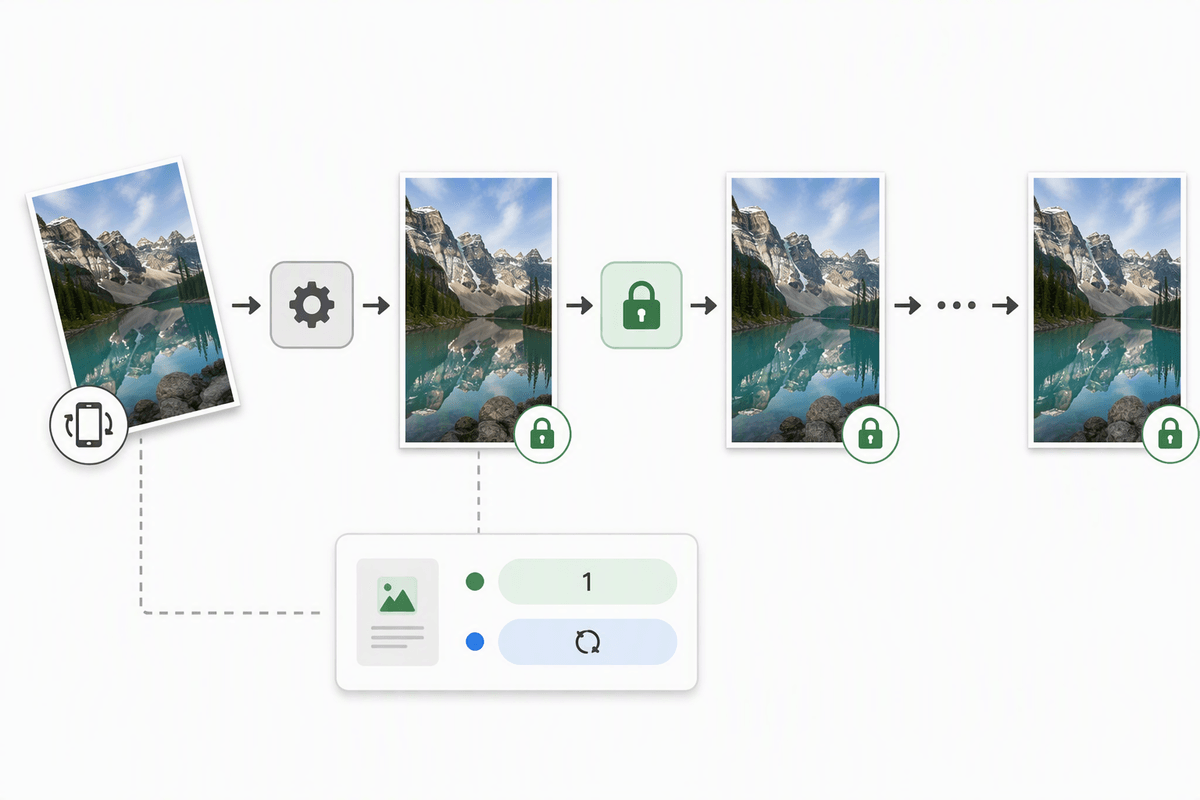
Double-rotations occur when two separate processing stages each assume they are the first to correct image orientation. A straightforward fix is to frame orientation handling as an explicit, one-way boundary: the decoder outputs pixels already aligned to the canonical “upright” coordinate frame, paired with a flag marking whether a transform was applied.
When persisting the result, enforce a normalized metadata contract alongside the pixel data: set the Orientation field to 1 (or remove it altogether), and log the original orientation in a separate field if auditability is needed. The core rule is that no downstream stage may re-derive orientation from EXIF data; all further processing works only with the canonical pixel set.
Label drift stems from treating annotations as “just numbers” rather than geometric data tied to the exact same coordinate frame as the underlying pixels. All geometric transforms should run exactly once, in the same function that generates the training tensor, and every associated annotation artifact must be transformed in that single pass: bounding boxes, polygons, masks, keypoints, and any cached crop windows. When a label type cannot be transformed reliably — a frequent problem with legacy RLE masks or mixed coordinate conventions — this constraint points toward normalization at ingest time, even if it requires re-encoding and adds a small amount of storage overhead.
How to verify the fix: audits, test images, and guardrails
You can’t trust a fix you can’t catch regressing. Build a small “orientation torture set” (all 8 EXIF orientations, plus common phone portrait shots) and run it through every entry point: training loader, inference API, thumbnailer, and labeling export. Assert invariants: decoded pixels are upright, Orientation is stripped or set to 1, and a known box/mask lands on the same pixels after every resize/crop. Add a production audit that samples images and logs (w, h, original Orientation, applied transform, hash of normalized bytes) so you can spot double-rotations quickly.
Guardrails matter because teams change code. Make the canonical decoder the only allowed import in your codebase, and fail fast if metadata still contains a non-1 Orientation after “normalization.” If you keep originals for audit, store them in a separate path/bucket so downstream jobs can’t accidentally train on them. The extra decode/encode and logging overhead is real, but it’s cheaper than retraining on silently rotated data.